Curiosity
A few days ago, I became curious about Jev after seeing people talking about it on Twitter X
. It was quite the hype on my timeline, with everyone mentioning it.
When I first searched for information about Jev, I thought it was just a simple classifier that we could use to classify anything. We would pass in a set of choices, and it would return probabilities based on the state and the instructions. Since I had only skimmed through a few explanations, I initially thought it was just a simpler kind of classifier. Because of that, I was still confused about what kinds of use cases Jev could actually solve.
Then, I started reading the explanation about Jev, and came across this post . After reading the entire post, I started to get a lot more ideas about what Jev could be used for.
According to the article in Langchain, Jev is not just a simple classifier, it’s what the TypeSafe AI team calls a System One model:
System One models are a class of AI models built to make fast, structured decisions that software can use directly. A System One model evaluates a state and returns typed answers and probabilities.
Problem
The post on X gave me a lot of ideas about how I could use Jev to solve some of the problems I’ve been facing. One of them is tool call definitions. When I have a large number of tools available, their definitions can consume a significant number of tokens in the initial conversation context. I’ve seen some articles suggest passing the request to a cheaper model first to determine which tools are relevant, and then letting the smarter model handle the actual execution. However, this approach can still consume thousands of tokens just to determine which tools are relevant to the user’s prompt.
Third parties tool calls
There are several third-party platforms that provide pre-built integrations and tools, while also acting as an execution layer between our application and external services. Some examples are Arcade , Nango , and Composio . These platforms can help us integrate with various providers and automate workflows without having to build and maintain every integration from scratch. Depending on the platform, they can also handle things like authentication, tool execution, and exposing integrations through MCP.
Composio
Composio is a platform that helps AI agents interact with external applications through pre-built tools and integrations. It provides toolkits for services such as Gmail, GitHub, Slack, and many other apps, with each toolkit containing executable actions and the required authentication configuration.
Composio also manages per-user authentication and connected accounts, so we don’t need to implement and maintain every OAuth or API-key integration itself. In this post, I will use Composio as an example of how we optimize token usage with Jev when using tool calls.
Usecase
Composio tool router
When we want to use tool calls, we need to provide the LLM with tool definitions so it knows which tools are available and how they can help the user automate different tasks. Composio provides a large collection of pre-built toolkits, and we can pass the relevant tools to the LLM. However, the interesting part of Composio is its Tool Router. Instead of passing all available tool definitions to the LLM, we can provide a small set of meta tools, including COMPOSIO_SEARCH_TOOLS. The agent can then use these meta tools to discover the tools it needs based on the user’s prompt and load the relevant tool definitions at runtime. This helps keep the initial context much smaller while still allowing the agent to access a large number of tools.
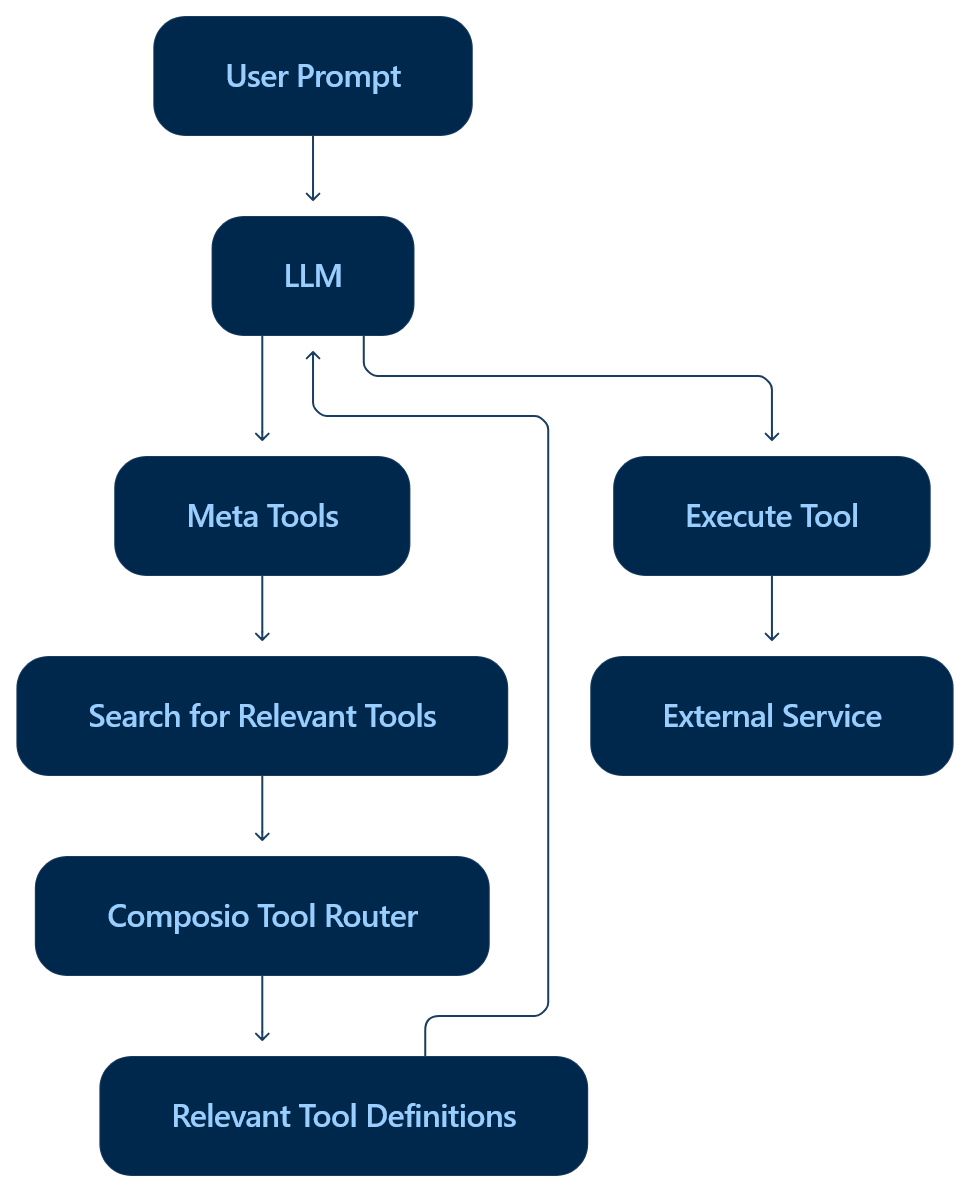
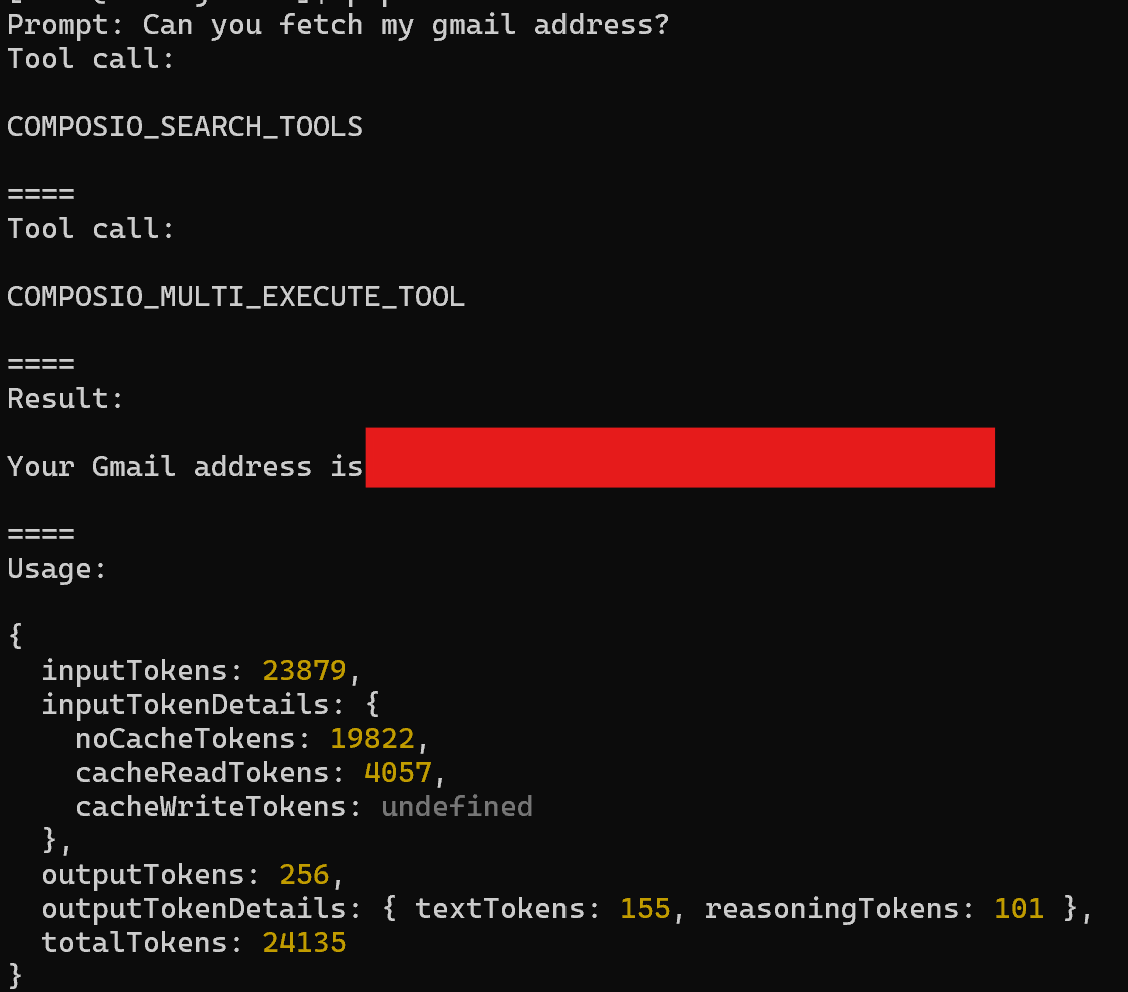
However, it still consumes a significant number of tokens because the meta tool definitions themselves can be quite large. In the example below, I used the Vercel AI SDK with Gemini and connected both my Gmail and Microsoft Teams accounts through Composio. Here’s the sample code to pass the Composio meta tools.
const session = await composio.create(userID);
const tools = await session.tools();

const prompt = '...';

const result = await generateText({
    model: google('gemini-3.7-flash'),
    prompt,
    stopWhen: isStepCount(5),
    tools,
  });
Even for a simple prompt, such as asking for my Gmail address, the request consumed around 24,135 Gemini tokens.
Using Jev to optimize
As mentioned earlier, Jev can make decisions based on the current state and a set of instructions, so I’ll use Jev to determine which tools are relevant to the user’s request. As of today (Sept 21, 2026), Jev is priced at $0.042 per 1 million input tokens, while output tokens are free. Additionally, until Sept 25, 2026, we can use Jev for free through the Vercel AI Gateway.
There are the three primitive question types supported by Jev’s API:
- Choice: selects exactly one option from a predefined list of unordered categories
- Noul: Evaluates a true/false proposition
- Score: rates an asset against an ordered rubric or scale that you define
In this section, I will use choice to help us determine which tool matches the user’s prompt.
const prompt = 'Can you fetch my gmail address?';
const jevResult = await experimental_evaluate({
    model: 'typesafe-ai/jev',
    state: `A user ask this prompt: ${prompt}.`,
    questions: {
      toolCall: {
        instructions: 'Which tool calls are relevant to answer the user prompt?',
        type: 'choice',
        criteria: {
          // Composio tool slug definitions
          GMAIL_ADD_LABEL_TO_EMAIL: "Adds and/or removes ...",
          GMAIL_BATCH_DELETE_MESSAGES: 'Tool to permanently delete multiple Gmail messages in bulk..'},
          ...
      }
    }
  })
It will return the matched tool.
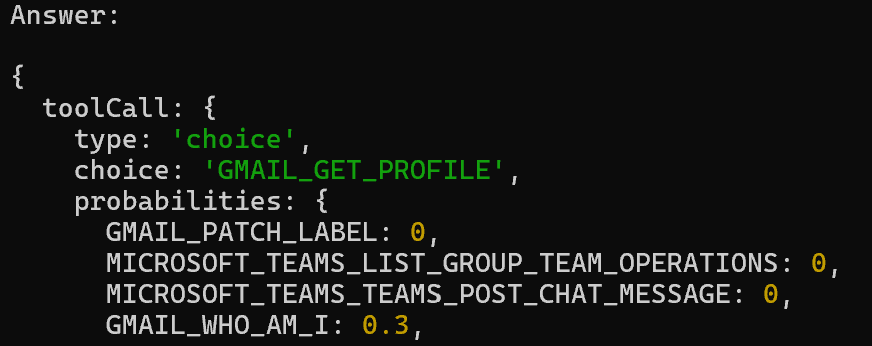
Then we can pass the matched tool slug.
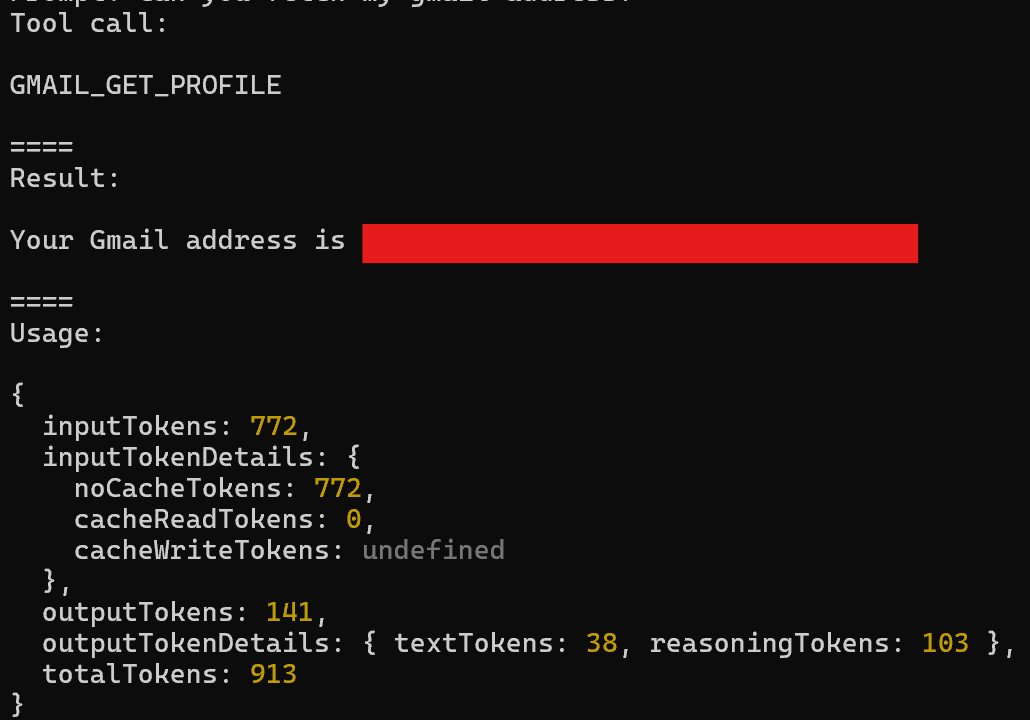
const tools = await composio.tools.get(userID, jevResult.answers.toolCall.choice);

await generateText({
    model: google('gemini-3.7-flash'),
    prompt,
    stopWhen: isStepCount(5),
    tools,
});
And it only consumed 913 Gemini tokens!
Multiple tools
Then, what if the user prompt requires multiple tools to execute? The choice field only returns a single answer with the highest probability, but the probabilities field returns all choices with their associated probability scores. Therefore, we can modify our code to retrieve the matched tools with high scores.
const probabilities = jevResult.answers.toolCall.probabilities ?? {};

// get all tools with a score > 0.1
const toolWithProbs = Object.entries(probabilities).filter(([, value]) => Number(value) > 0.1).map(([key]) => key);

const decidedToolSlugs = await composio.tools.get(userID, { tools: toolWithProbs });

await generateText({
    model: google('gemini-3.7-flash'),
    prompt,
    stopWhen: isStepCount(5),
    tools: decidedToolSlugs,
});
And it only cost 2,249 Gemini tokens!
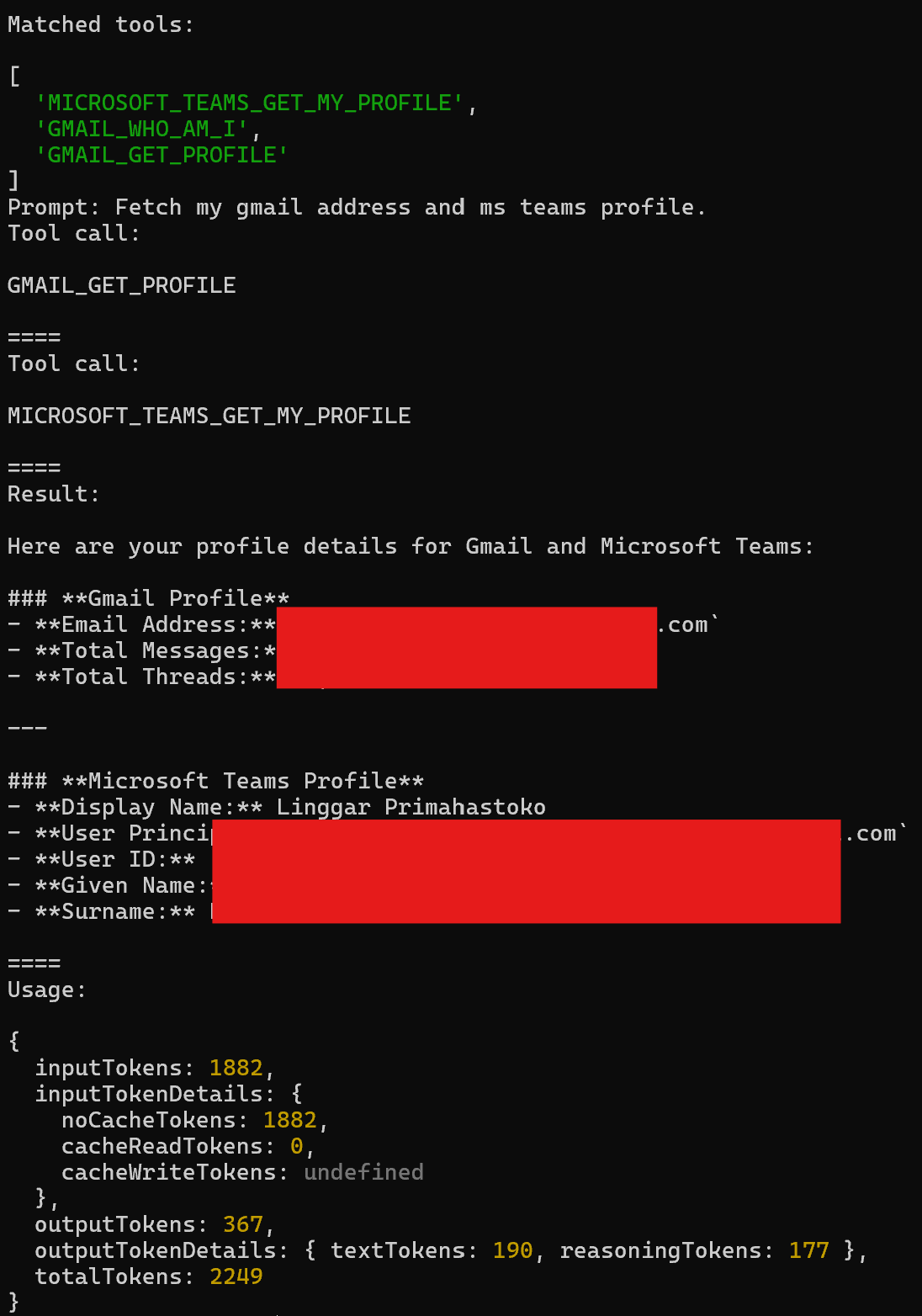
Relevant tools
When it comes to relevance, I tested Jev with prompts that were unrelated to the connected tools. It turned out that even when the prompt was unrelated, Jev would sometimes still return high probability scores.
To address this, we can optimize the flow by using the Noul / boolean type to first determine whether the user’s prompt is relevant to any of the connected toolkits.
// return [gmail, microsoft_teams]
const toolkits = ...

const jevResult = await experimental_evaluate({
    model: 'typesafe-ai/jev',
    state: `A user ask this prompt: ${prompt}.`,
    questions: {
        toolCall: {
            instructions: 'Which tool calls are relevant to answer the user prompt?',
            type: 'choice',
            criteria: {
                // Composio tool slugs
                ...
            },
        },
        relevant: {
            type: 'boolean',
            instructions: `I have these toolkits connected: ${toolkits.join(',')}. Can these toolkits help to answer the user's question?`,
        }
    }
})
Here’s the result with related prompt:
Prompt: Fetch my gmail address and ms teams profile.
Relevant: {"type":"boolean","probability":0.8}
And here’s the result with unrelated prompt:
Prompt: Find any events taking place around Tokyo tomorrow.
Relevant: {"type":"boolean","probability":0.06}
We can then use this flow to decide whether we should include the available tools in the LLM request.
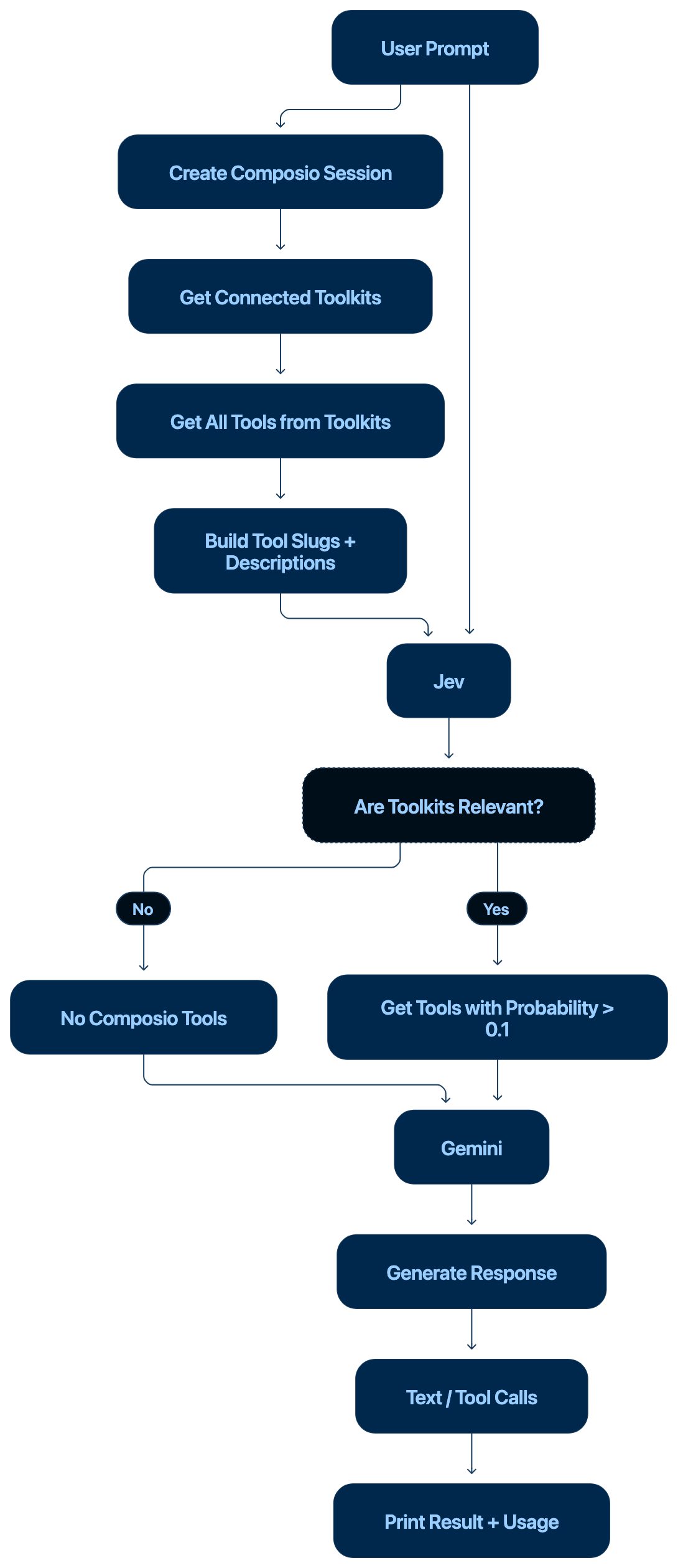
Then I tried sending a prompt that was not related to the available tools.
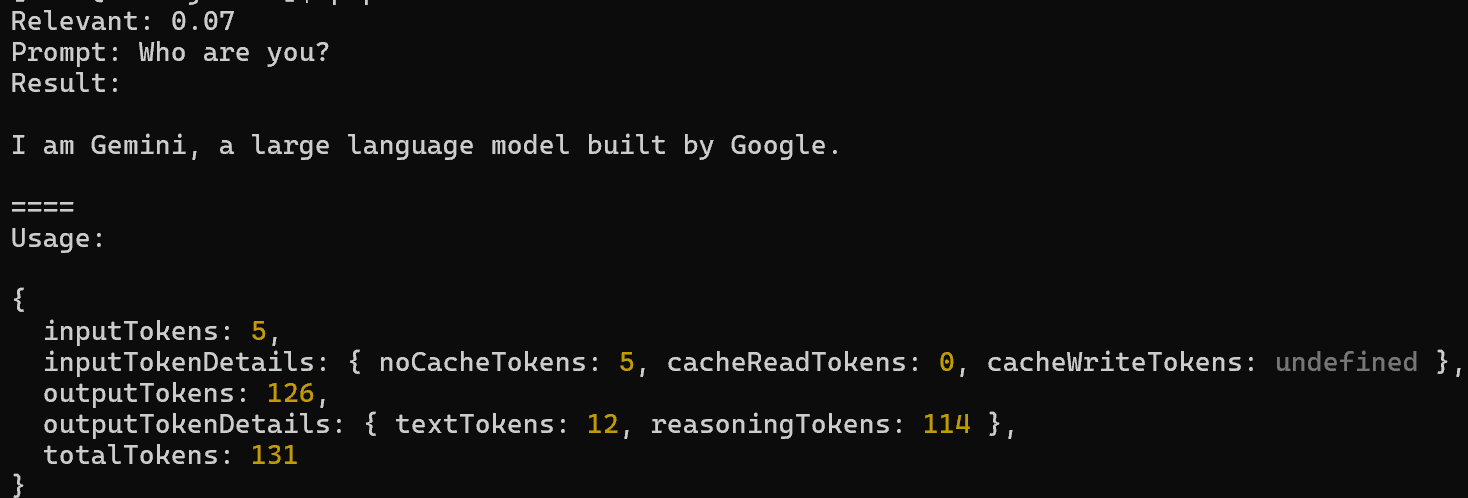
With this approach, the request consumed only 131 Gemini tokens because we didn’t pass any tool definitions to Gemini when the connected toolkits were determined to be irrelevant to the prompt.
Notes
Some notes from testing this flow with Jev:
- There are 219 tools with their definitions, which consume around 13,000 input tokens. This means a single call with all of these tools costs approximately $0.000546.
- Jev allows a Choice question to include up to 255 options per query, so we need to handle cases where there are more than 255 tools differently.
Conclusion
This is still an early exploration of Jev, so I only tested the basic flow and did not cover edge cases or evaluate its reliability in a production environment. The tool-selection flow described here is just one example of how Jev could be used. Its ability to make decisions based on state and instructions opens up many other potential use cases beyond tool selection. There is still a lot more to explore, but this experiment gave me a better understanding of how Jev could help simplify LLM workflows while reducing the amount of unnecessary context passed to the main model.